
IPTV Installation Guide
How To Install IPTV
IPTV Setup Tutorials
Select your device bellow to open a clear , step-by-step installation guide.
Amazon Firestick Setup Guide
Get streaming in under 5 minutes-Beginner friendly
Enable Unknown Sources
Go to Settings → My Fire TV → Developer Options → Enable "Apps from Unknown Sources". If you don't see Developer Options, go to Settings → My Fire TV → About → click on "Fire TV Stick" 7 times to enable it.
Download Downloader App
From your Firestick home screen, go to the Search icon and type "Downloader". Install the orange Downloader app by AFTVnews.
Get The IPTV Smarters Pro App
Open Downloader, enter this code 4257940. The IPTV Smarters Pro app will download. Click Install when prompted.
Enter Your Credentials
Open the IPTV app. Select "Add User" or "Login with Xtream Codes API". Enter your Username, Password, and Server URL from your welcome email.
Start Watching!
Your channel list will load automatically. Browse categories, add favorites, and enjoy 23,000+ channels in stunning 4K quality.
Need Help?
Our support team is available 24/7 to help you get set up. We can walk you through the process via WhatsApp, email, or even remote assistance.
Android Tv/Android Box Setup Guide
Works on any Android Tv— TCL, Xiaomi,Sony, Tv Boxes
Download Downloader App
Open the Google Play Store on your Android Tv. Search for Downloader.
Get the IPTV Smarters Pro
Open Downloader, enter this code 4257940. The IPTV Smarters Pro app will download. Click Install when prompted.
Choose Login Method
Tap "Login with Xtream Codes API" — this is the recommended method as it gives you EPG, categories, and VOD organisation.
Enter Your Credentials
Enter a profile name (anything you like), then your Username, Password, and Server URL from your welcome email. Tap "Add User".
Start Watching on AndroidTv
Tap on your new profile. The app will load Live TV, Movies, Series, and EPG categories. Add favourite channels by long-pressing them.
Need Help?
Our support team is available 24/7 to help you get set up. We can walk you through the process via WhatsApp, email, or even remote assistance.
Formuler/Dreamlink Setup Guide
5 to 8 minutes MyTVOnline / DOL2
Open MyTVOnline
Open MyTVOnline 2 or 3 from your Formuler home screen
Inside the MyTVOnline
Navigate to Menu→Connections→Add Portal
Configure your Xtream Codes connection
Portal Name: Enter any name (e.g., "Irish IPTV") Portal URL: Enter your server URL Login Required: Enable this option Username: Enter your IPTV username Password: Enter your IPTV password
Press "Connect" to establish the connection.
Enter a profile name (anything you like), then your Username, Password, and Server URL from your welcome email. Tap "Add User".
Your channels should now load and you're ready to watch!
Start Watching
Need Help?
Our support team is available 24/7 to help you get set up. We can walk you through the process via WhatsApp, email, or even remote assistance.
Smart Tv Setup Guide - All Brands (Not Android)
Works on any Smart Tv— Samsung, Lg, Sony, Visio, Hisense
Hot Player
On your Smart TV, open your App Store (LG Content Store, Samsung Apps, etc.). In the search bar, type "Hot IPTV" or "Hot Player". Select Hot Player from the search results. Click "Install" or "Download" to install the app on your Smart TV.
Get Your Device Credentials
Open the Hot Player app on your Smart TV. You will see your MAC Address displayed on the screen. Write this down or take a photo - you'll need it for the next step.
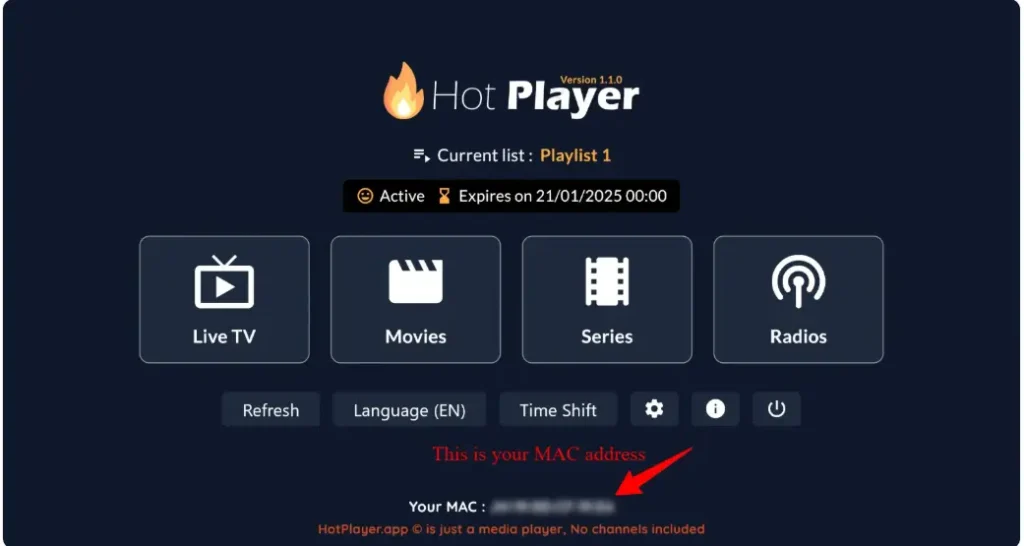
Activate Your Hot player Licence (1year)
Hot Player needs a one Year Activation. Get a 1 Year Activation from us For only 9,99eur\Year
Activating your Hot Player one Year Licence
Send a whatsapp message to us with your Mac Adress and and mention 1Year Hot Player subscription. Our support Team will send you payement Link For your 1 year Hot Player Licence. when the payement is completed your Hot Player will bee activated.
Configure Your Playlist Online (Hot Player) Gives a Free Trial For 30Days
On your phone, tablet, or computer, visit: https://hotplayer.app. Click on "Upload List" in the menu.
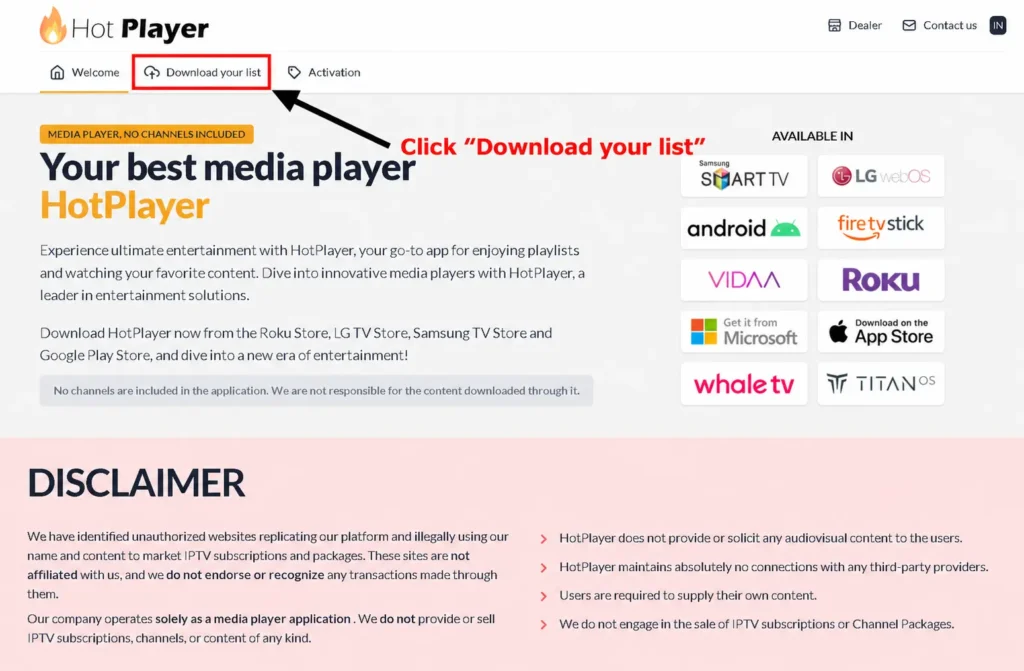
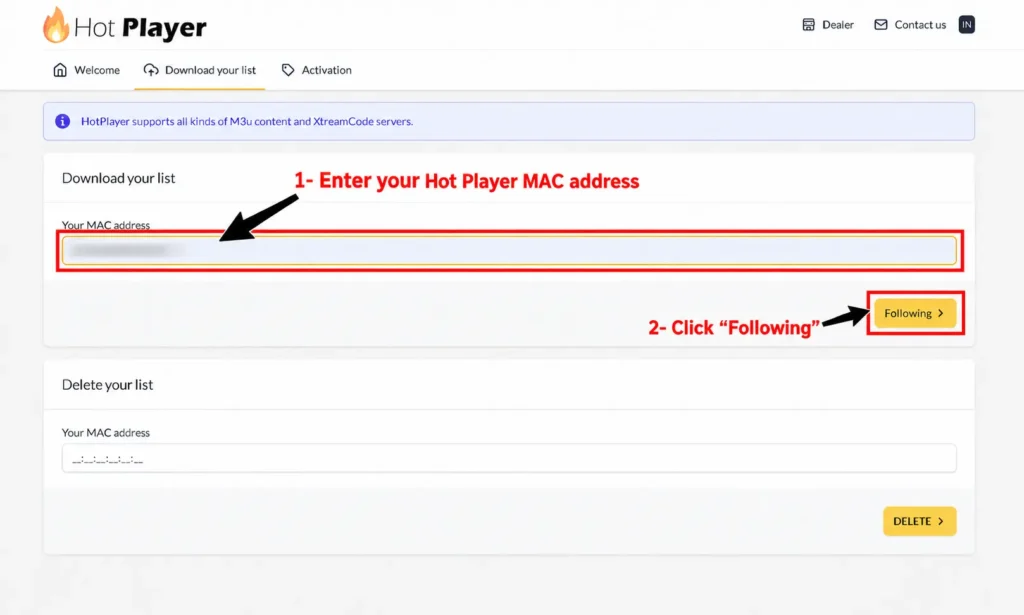
Enter the MAC Address from your Smart TV, then click "Next"
On your phone, tablet, or computer, visit: https://hotplayer.app. Click on "Upload List" in the menu. Enter the MAC Address from your Smart TV, then click "Next"
Fill in your IPTV playlist details
Playlist Name: Enter any name you want (e.g., "Irish IPTV") Host: Your Server Address Username: Your IPTV username Password: Your IPTV password
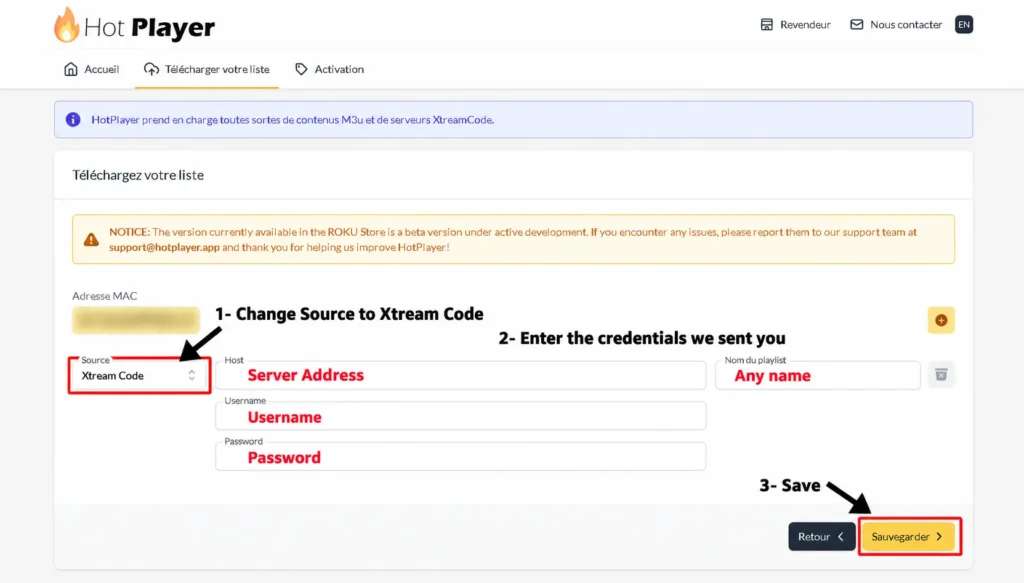
Then click "Save"
Return to your Smart TV click Refresh or restart the Hot Player App
Need Help?
Our support team is available 24/7 to help you get set up. We can walk you through the process via WhatsApp, email, or even remote assistance.
iOS Setup Guide (iPhone & iPad)
Works on iPhone 8 and newer, all iPads (iOS 13+), and Apple TV

When Installed
Open iMPlayer do not register an account if you want to continue with free version And click on ""Add Playlist""
Select Playlist type ""XC API""
Fill in with your Credentials Playlist Name: Enter any name you want (e.g., "Irish IPTV") Host: Your Server Address Username: Your IPTV username Password: Your IPTV password
Click on Add Playlist
Wait until contents Finish downloading and enjoy streaming
Need Help?
Our support team is available 24/7 to help you get set up. We can walk you through the process via WhatsApp, email, or even remote assistance.
PC & Mac Setup Guide
Easy step-by-step instructions for all devices. Get streaming in minutes — no technical knowledge required. Choose your device below to begin.
IPTV Smarters Pro
Open a browser and type "IPTV Smarters Pro" into the search bar.
go to the official website of IPTV Smarters Pro
If Windows asks for permission, click "Yes" to allow the app to install .The installation will now begin. It typically takes under 2 minutes
Once installed
Once installed, launch the IPTV Smarters app. Click Add New User, then choose "Login with Xtream Codes API
Enter your IPTV account details: Username, Password, and Portal URL
That's it! You're ready to start streaming with IPTV Smarters Pro
Methode 2 : MyIPTV Player windows(10/11)
Download MyIPTV Player From Microsoft Store
Go to settings
Click on ""Add new playlist and EPG source""
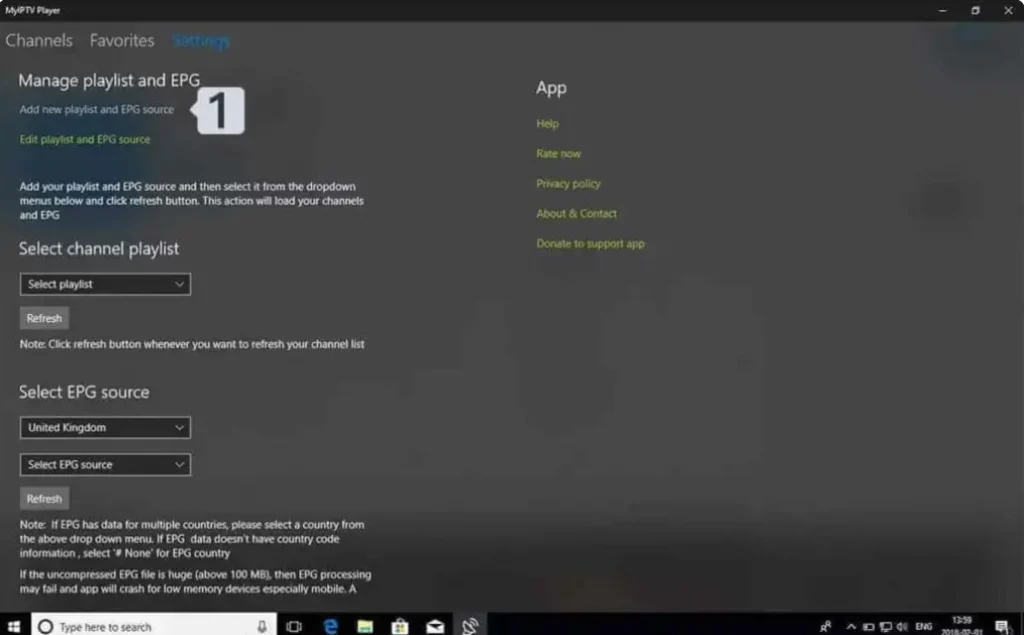
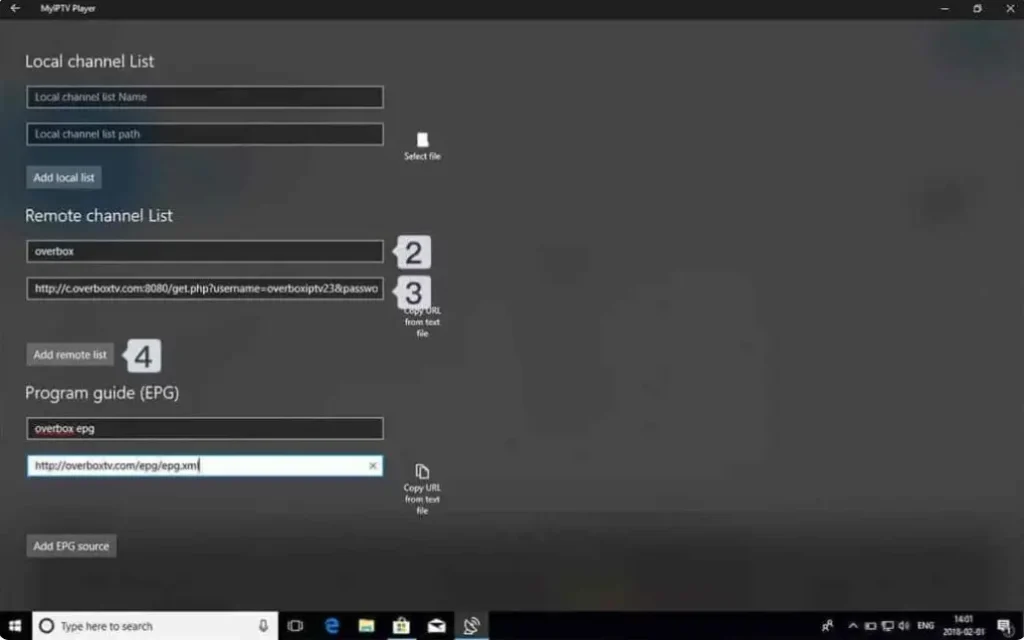
Add your M3U playlist
Name: Give your playlist a name (e.g ""iptv"") / Url : paste the M3u Link you received From iptvirelandsub.irish / Click on Add remote list
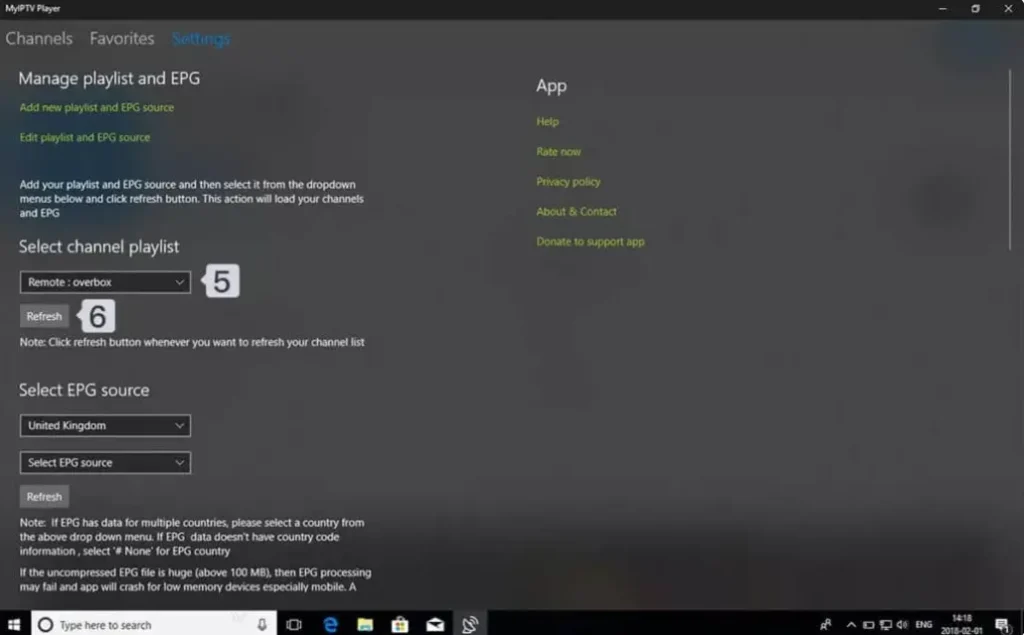
Go back to Settigns and choose your playlist from the Select Channel Playlist
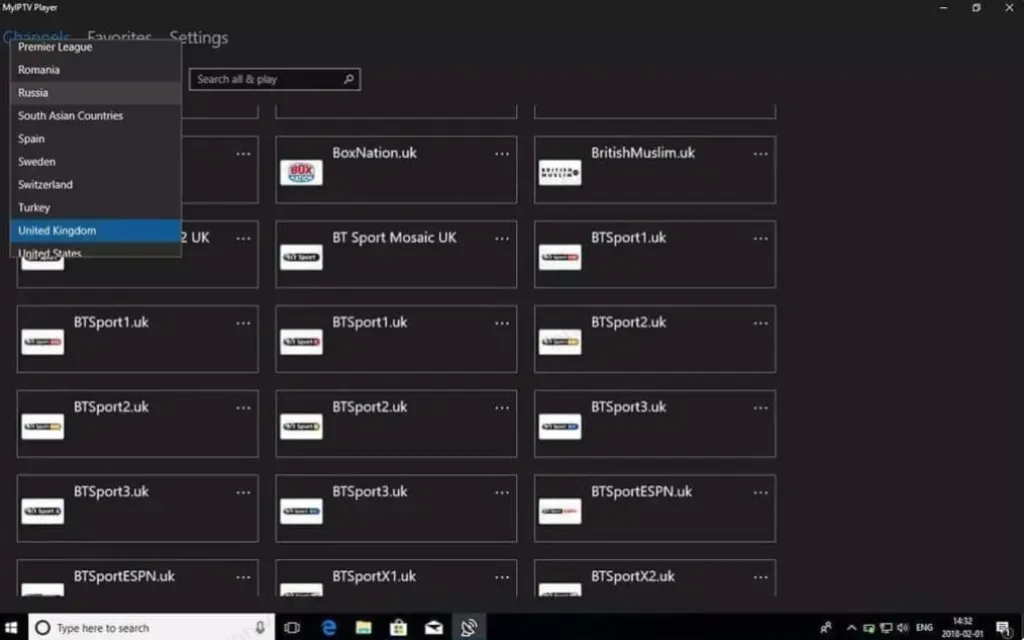
Done! Go to the Channles tab, choose your contry, and start watching your favorite TV and VOD content
Need Help?
Our support team is available 24/7 to help you get set up. We can walk you through the process via WhatsApp, email, or even remote assistance.
Android Setup Guide (Phone)
Works on any Android device — Samsung Galaxy, Google Pixel, Xiaomi, OnePlus, Android TV boxes & more
When Installed
Open iMPlayer do not register an account if you want to continue with free version And click on ""Add Playlist""
Select Playlist type ""XC API""
Fill in with your Credentials Playlist Name: Enter any name you want (e.g., "Irish IPTV") Host: Your Server Address Username: Your IPTV username Password: Your IPTV password
Click on Add Playlist
Wait until contents Finish downloading and enjoy streaming
Need Help?
Our support team is available 24/7 to help you get set up. We can walk you through the process via WhatsApp, email, or even remote assistance.
BuzzTV Setup Guide
Works on any version
From your BuzzTV home screen, navigate to Server Settings
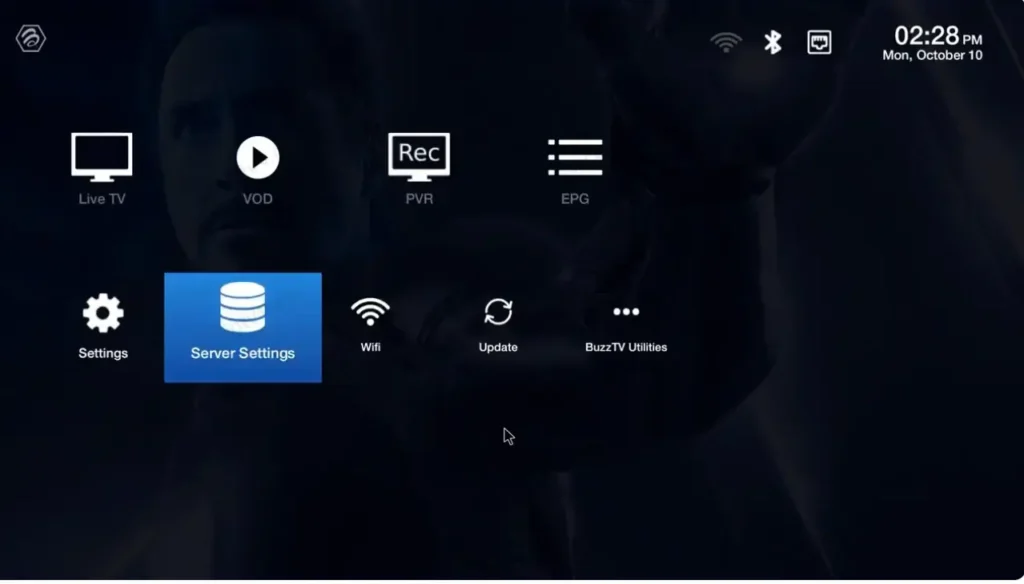
Select XC API Login >Add XC API Login
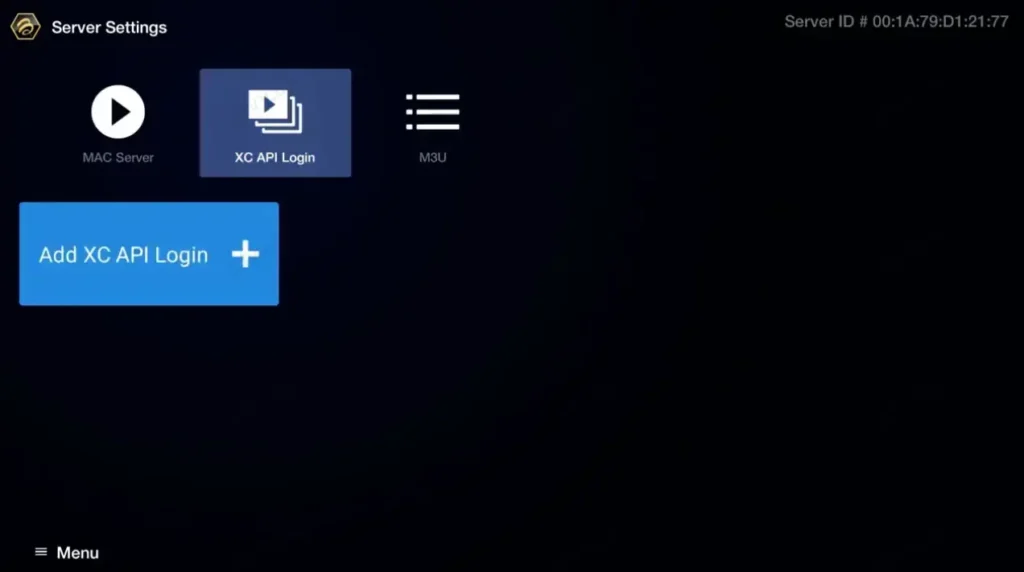
Configure your Xtream Codes connection:
Portal Name: Enter any name (e.g., "Irish IPTV") Portal URL: Enter your server URL User name: Enter your IPTV username Password: Enter your IPTV password
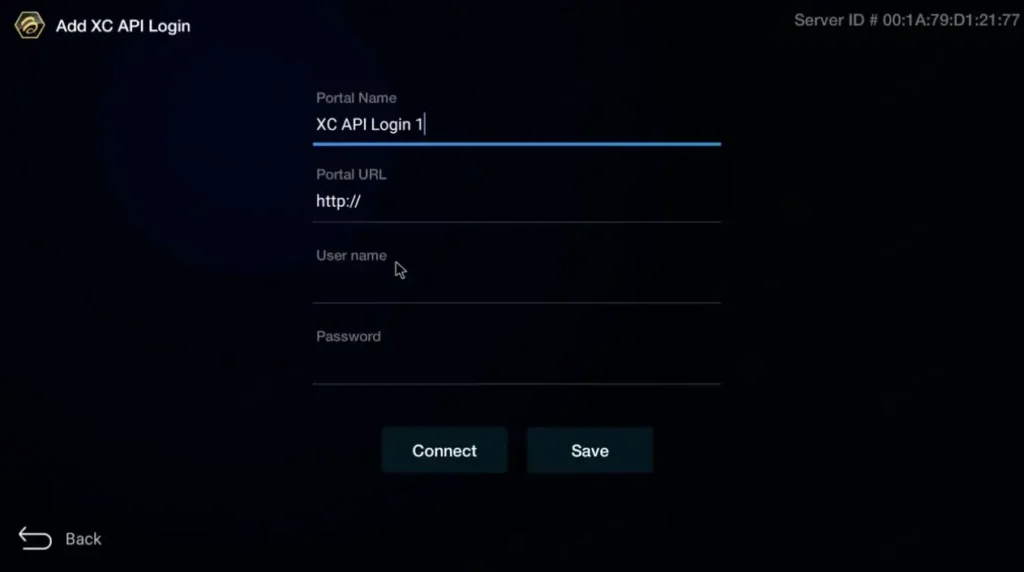
Press "Connect" or "Save" to establish the connection
Return to home screen and select Live TV to start watching!
Need Help?
Our support team is available 24/7 to help you get set up. We can walk you through the process via WhatsApp, email, or even remote assistance.
Roku Device setup Guide
5 to 7 minutes Hot Player Channel Store
Hot Player on Roku Device
On your Roku Device). In the search bar, type "Hot IPTV" or "Hot Player". Select Hot Player from the search results. Click "Install" or "Download" to install the app on your Roku Device.
Get Your Device Credentials
Open the Hot Player app on your Smart TV. You will see your MAC Address displayed on the screen. Write this down or take a photo - you'll need it for the next step.
Activate Your Hot player Licence (1year)
Hot Player needs a one Year Activation. Get a 1 Year Activation from us For only 9,99eur\Year
Activating your Hot Player one Year Licence (9,99eur/1Year)
Send a whatsapp message to us with your Mac Adress and and mention 1Year Hot Player subscription. Our support Team will send you payement Link For your 1 year Hot Player Licence. when the payement is completed your Hot Player will bee activated.
Configure Your Playlist Online (Hot Player) Gives a Free Trial For 30Days
On your phone, tablet, or computer, visit: https://hotplayer.app. Click on "Upload List" in the menu.
Enter the MAC Address from your Smart TV, then click "Next"
On your phone, tablet, or computer, visit: https://hotplayer.app. Click on "Upload List" in the menu. Enter the MAC Address from your Smart TV, then click "Next"
Fill in your IPTV playlist details
Playlist Name: Enter any name you want (e.g., "Irish IPTV") Host: Your Server Address Username: Your IPTV username Password: Your IPTV password
Then click "Save"
Return to your Smart TV click Refresh or restart the Hot Player App
Need Help?
Our support team is available 24/7 to help you get set up. We can walk you through the process via WhatsApp, email, or even remote assistance.
MAG BOX Setup Guide
Get streaming in under 5 minutes-Beginner friendly
MAG BOX Not Spported
Please Try to get a firestick or an Android Tv Box.
Everything You Need to Set Up IPTV in Ireland
This page covers IPTV setup for all popular devices—from Amazon Firestick, Android TV/BOX, Formuler Z/Dreamlink, Samsung and LG Smart TVs, Apple/iOS, Windows/Mac, Android Phone, BuzzTV Box, Roku Device and MAG Box. Every guide is designed to make installation quick and simple.
What You Need Before You Start
- An active IPTV Ireland subscription starting from €14 per month.
- Your welcome email containing your username, password and server URL.
- A stable internet connection—10 Mbps for Full HD and 25 Mbps for 4K.
- A supported device such as Firestick, Smart TV, Android, iOS, Windows, Mac, Roku, BuzzTV, Formuler or MAG Box.
Which Device Is Best for IPTV in Ireland?
For most households, we recommend an Amazon Firestick because it is affordable, easy to configure and compatible with most televisions. Samsung and LG Smart TVs can use supported IPTV applications directly. Android TV boxes and Formuler devices provide additional flexibility and excellent 4K performance.
Recommended IPTV Apps for Ireland
These are some of the most popular IPTV applications for Irish users:
- IPTV Smarters Pro—simple to use and available on many devices.
- TiviMate—recommended for Android TV and Amazon Firestick devices.
- SmartOne IPTV—compatible with many Samsung and LG Smart TVs.
- MyTVOnline—recommended for Formuler devices.
Troubleshooting Common IPTV Setup Issues
The two most common issues during IPTV setup in Ireland are buffering and login errors. Buffering is usually caused by Wi-Fi speed. Connecting your device using an Ethernet cable can often solve the problem.
Login errors are normally caused by an incorrect username, password or server URL. Double-check that you copied the complete URL, including http:// or https://. If you still need assistance, visit our FAQ section or contact our 24/7 support team.
Ready to Start Streaming?
If you haven't subscribed yet, visit our pricing section to compare IPTV Ireland plans starting from €14 per month. You can also contact our support team to request more information.
Already subscribed? Select your device below and follow the installation steps.